How to set up your EESS – Printable instructions
First of all thanks for purchasing or considering purchasing the EESS.
This page will take you step by step through the set up of the survey from the point that you click on the ‘buy now‘ button, through to deploying your employee survey.
This information will be available here and once you have paid you will have access to the ‘consultant admin’ area with further access to this and other material.
For your convenience you may chose to print this page for reference.
First step of login – purchase or re-login: –

Returning users use the box on the left – new purchasers register via the link on the right.
Step 1 – enter your details:

Username and Password
Firstly decide on your username and password. This needs to be unique to you. This will enable you to access the EESS at a later date to run the output of your EESS or to purchase another review at a later date for comparison purposes.
Next we need some information about you and your organization.
Step 2 – select the number of responders (staff) that will participate in the EESS:
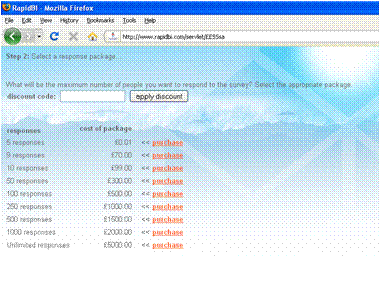
If you have a discount code use it at this stage.
Please note this is the MAXIMUM number of people that will be able to contribute to your survey.
Payment – Payment is via PayPal:
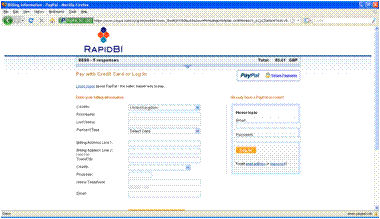
Once payment has been completed successfully you will proceed to setting up the survey.
Step 3 – enter company details:

Here we need the name of your company, the sector in which the company operates and the location the business is based (city and country).
What sector does your company operate in? Construction, service, manufacturing, service etc?
How many sites does your company operate from (i.e. sites that responders work – are you a single site company, two or multiple?)
How many employees does your company employ?
Where is your company based? town, state and country – i.e. Ealing, London, UK or St Pauls, MN, US
What is the trading or legal status of the company being surveyed.
This data will be used for increased benchmarking as data increases.
Step 4 -Setting the name of this survey and any custom questions:
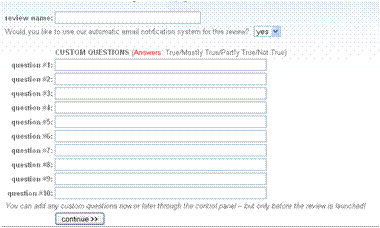
The Review name is a name you set that will help you to identify the survey results in the future. We recommend the format to be <companyname><month><year>.
This will make comparisons easier to set up for the future.
Custom questions
In the EESS you can have up to 10 custom multiple choice questions. they can be entered at this stage or later through the control panel.
The format of the questions (actually a statement of performance) should be:
“everyone in the company xxxxx” –
Where the answer is – True, Mostly true, Partly true or Not true.
Please take care to ensure the questions are worded clearly.
Keep statements short – to be effective it is best if they are less than 70 characters long.
Step 5 – communicate and announce your survey:

The EESS system has the ability (optional but included) to announce your survey to your recipients by email directly.
The data on this page provides the content for the emails, so input here the name and contact details of the person administering the survey on your behalf.
Using cut and paste you an input all the email addresses of your potential responder, please check for valid addresses and that each address is separated by a comma and a space.
Survey communication management
In the lower half of this page is the date management system:

The first date is the date the survey stops (expires), this can be changed in the admin centre later. It is set at 14 days after purchase as default.
Our optional email system sends 3 emails on the date set.
- The first is an announcement that the company is undertaking a survey and for responders to keep an eye out for the instructions. (this helps increase response rates – remember we do not track any details of responders)
- The second includes a link to the login area and the username and password.
- The third is a final reminder – best to send this 24 hours before the survey closes – note this goes to all responders irrespective if they have completed the survey or not.
Expectation management
The feedback date is a date in the email informing staff when they should expect to hear the initial feedback.
We believe staff feedback is essential so include this information within the emails notifying staff of the survey – we DO NOT send emails on this date. Please ensure that this date is realistic for you to work with.
If you do not wish to use our email system and want to distribute the access information manually then click on “skip this step”
Step 6 -initial setup complete

This page confirms that you have successfully set up your survey and provides you with the access information to provide to your staff:

This information is also emailed to you.
If you require to change the custom questions or any dates you can do so in the admin control panel:
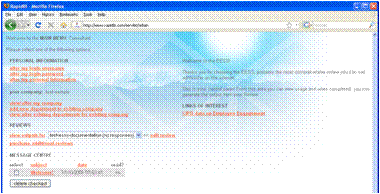
In the administration control panel useful sections include:
- Alter/ view my company
- Edit review
Setup complete
So when you are ready you can purchase and use your EESS. Full email support is provided please use the email address provided at purchase or via our contact up page. We aim to answer all questions within 24 hours.
Note throughout the setup process the person leading the implementation in our system is called “The Consultant” – you may be an internal or an external consultant. This role helps us to differentiate responders from the person facilitation or leading this process. The consultant may or may not contribute to the process equally anonymously as all other responders.
If you have any questions or need support please use the address sent with your purchase or our comments form.